
PvZ Clone - Day 1
오늘 한거
- ColorRect로 단색 배경 깔기 (Main 노드 하위)
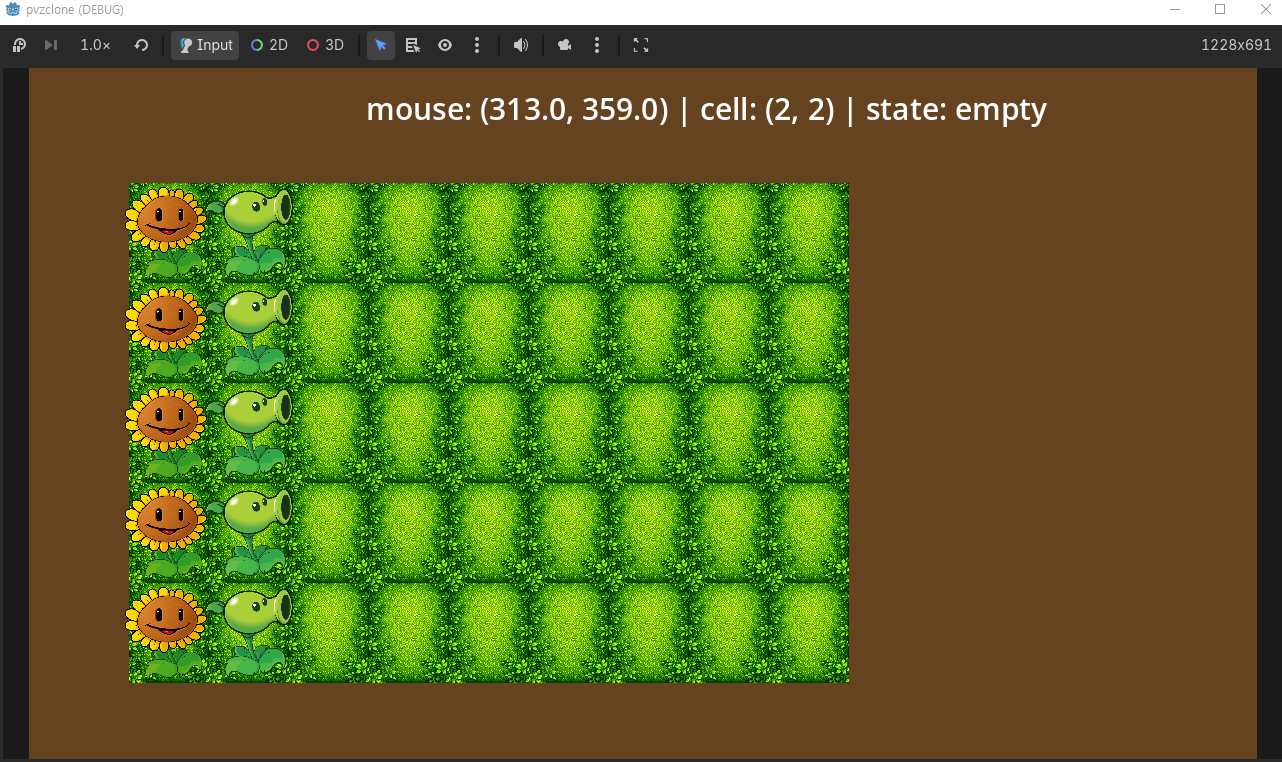
- GameBoard Scene 구현
- 5×9 그리드 2D 배열로 관리
- 타일 텍스처 좌표 계산해서 렌더링
- 마우스 클릭 → 셀 좌표 변환, valid cell 체크
- 좌클릭으로 식물 심기, 우클릭으로 제거 (queue_free)
- Plant 베이스 씬 + Peashooter, Sunflower 상속 구조로 분리
- enum으로 선택 식물 관리, 키 1/2로 전환
extends Node2D
@export var cell_width: int = 80
@export var cell_height: int = 100

@export var GRID_OFFSET_X = 100
@export var GRID_OFFSET_Y = 115


enum PlantType {PEASHOOTER, SUNFLOWER}
var selected_plant = PlantType.PEASHOOTER

var PeashooterScene = preload("res://scenes/peashooter.tscn")
var SunflowerScene = preload("res://scenes/sunflower.tscn")

var TILE_SIZE: Vector2
const COLS = 9
const ROWS = 5

const TILE_TEXTURE = preload("res://assets/img/garden.png")


var grid = []
func _ready():
    TILE_SIZE = Vector2(cell_width, cell_height)
    # draw tiles
    for row in ROWS:
        for col in COLS:
            var sprite = Sprite2D.new()
            sprite.texture = TILE_TEXTURE
            sprite.position = Vector2(col * TILE_SIZE.x, row * TILE_SIZE.y) + TILE_SIZE / 2
            sprite.position.x += GRID_OFFSET_X
            sprite.position.y += GRID_OFFSET_Y
            add_child(sprite)
    # initialize grid
    for row in range(ROWS):
        grid.append([])
        for col in range(COLS):
            grid[row].append(null)


func _input(event):
    # key vs click separation

    if event is InputEventKey and event.pressed:
        if event.keycode == KEY_1:
            selected_plant = PlantType.PEASHOOTER
        elif event.keycode == KEY_2:
            selected_plant = PlantType.SUNFLOWER

    if event is InputEventMouseButton and event.pressed:
        var cell = get_cell(event.position)
        if not is_valid_cell(cell):
            return
        if event.button_index == MOUSE_BUTTON_LEFT:
            if grid[cell.y][cell.x] == null:
                plant_at(cell)
        elif event.button_index == MOUSE_BUTTON_RIGHT:
            if grid[cell.y][cell.x] != null:
                remove_plant(cell)

func remove_plant(cell: Vector2i) -> void:
    if grid[cell.y][cell.x] != null:
        grid[cell.y][cell.x].queue_free()
        grid[cell.y][cell.x] = null

func plant_at(cell: Vector2i):

    var plant
    match selected_plant:
        PlantType.PEASHOOTER:
            plant = PeashooterScene.instantiate()
        PlantType.SUNFLOWER:
            plant = SunflowerScene.instantiate()
    if plant == null:
        return

    plant.position = cell_to_world(cell)
    add_child(plant)
    grid[cell.y][cell.x] = plant

func cell_to_world(cell: Vector2i) -> Vector2:
    return Vector2(
        GRID_OFFSET_X + cell.x * cell_width + cell_width / 2,
        GRID_OFFSET_Y + cell.y * cell_height + cell_height / 2
    )

func get_cell(world_pos: Vector2) -> Vector2i:
    var col = int((world_pos.x - GRID_OFFSET_X) / cell_width)
    var row = int((world_pos.y - GRID_OFFSET_Y) / cell_height)
    return Vector2i(col, row)

func is_valid_cell(cell: Vector2i) -> bool:
    return cell.x >= 0 and cell.x < COLS and cell.y >= 0 and cell.y < ROWS
배운 것
Godot에서 씬이 클래스, instantiate가 new랑 같은 개념이라는 걸 알게 됨.
Plant 베이스 씬을 상속해서 Peashooter, Sunflower를 만드는 구조가 결국 OOP인듯
근데 아까 본 유튜브 영상에서 너무 OOP에만 집중하지 않고 각각의 기능에 집중하는 Composition 위주의 개발을 소개하는걸 봤는데 참고할만한 내용인듯.
다음에 할 것
- 햇빛 시스템 (해바라기 → 햇빛 생성 → 카운터 UI)
- 식물 선택 UI (PlantSelector scene)