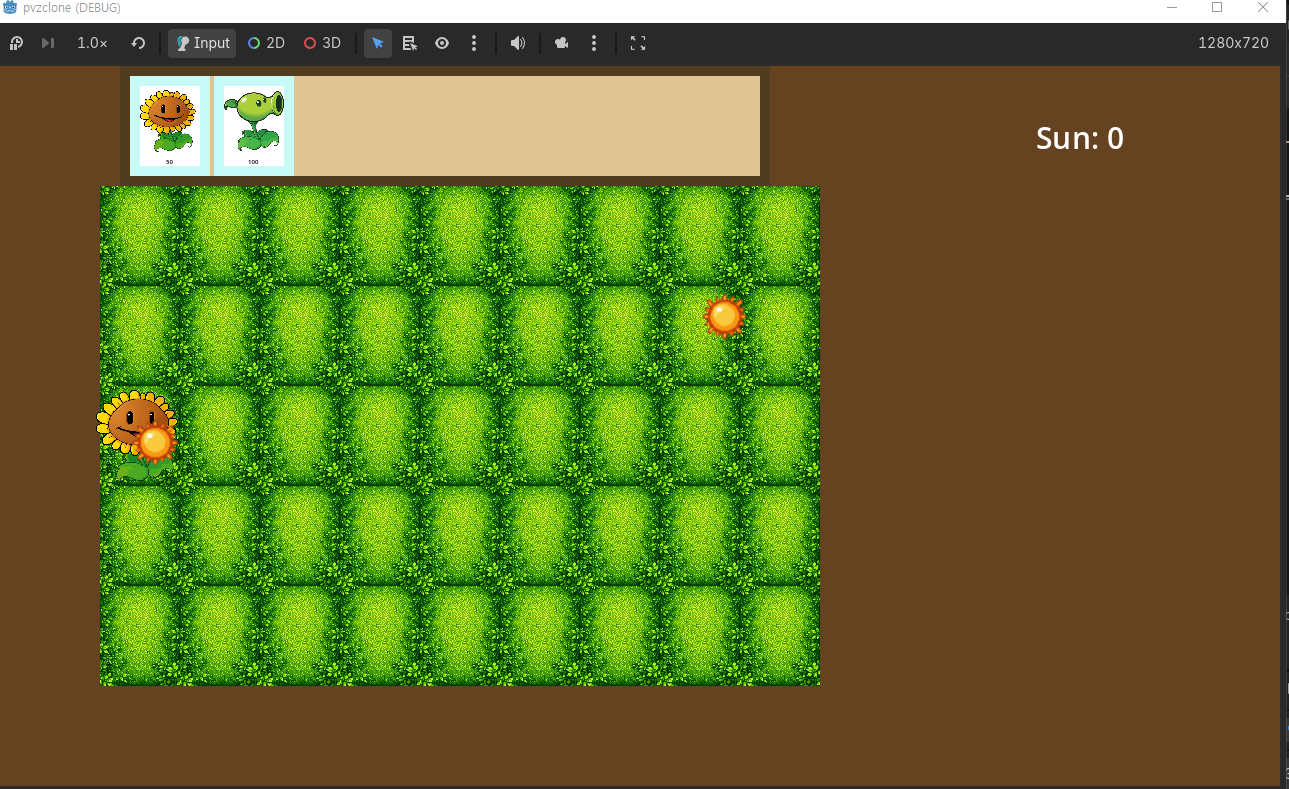
오늘 구현한 것
1. 식물 선택 UI (PlantCard + PlantUI)
씬 구조
Main
└── PlantUI (CanvasLayer)
    └── Panel
        └── PlantCardContainer (HBoxContainer)
            ├── PlantCard (TextureButton)
            ├── PlantCard (TextureButton)
            └── PlantCard (TextureButton)
PlantCard.tscn
PlantCard (TextureButton)
└── PanelContainer       ← StyleBoxFlat 배경/테두리
    └── VBoxContainer
        ├── PlantSprite (TextureRect)
        └── PlantCost (Label)
- TextureButton 하위 노드는 모두 Mouse Filter → Ignore 필수
- TextureRect: Expand Mode → Fit Width, Stretch Mode → Keep Aspect Centered
- 카드 크기: Custom Minimum Size로 고정 (60×80 기준)
2. 동적 카드 생성 (plant_ui.gd)
plants배열(딕셔너리)로 식물 데이터 관리_ready()에서 PlantCard 인스턴스 동적 생성- add_child() 후 setup() 호출 (순서 중요 — @onready가 씬 트리 진입 후 초기화됨)
- 생성된 카드를
cards배열에 저장해 하이라이트 제어
var plants = [
    {"type": PlantType.SUNFLOWER, "cost": 50, "texture": load("res://assets/img/sunflower.png")},
    {"type": PlantType.PEASHOOTER, "cost": 100, "texture": load("res://assets/img/peashooter.png")}
]
3. 카드 선택 & 하이라이트
- 카드 클릭 →
plant_selected(type, card)시그널 emit plant_ui.gd의_on_card_selected()에서:- 모든 카드 modulate 초기화
- 클릭된 카드만 밝히기 (
Color(1.5, 1.5, 1.5)) game_board.select_plant(type, cost)호출
4. 심기 & 햇빛 차감 (game_board.gd)
is_selecting변수로 선택 상태 관리- 그리드 클릭 시
SunManager.sun_count >= cost체크 후 심기 - 햇빛 부족 시
reset_ui시그널 emit → 카드 하이라이트 해제 - 심은 후
planted시그널 emit → 카드 하이라이트 해제
func select_plant(type, cost):
    selected_plant = type
    self.cost = cost
    is_selecting = true
5. Sunflower → Sun 생성 연동
시그널 흐름
Sunflower (sun_pop) → GameBoard (sun_spawned) → Main (spawn_sun)
- Sunflower: 24초 주기 타이머로
sun_pop(global_position)emit - GameBoard:
_on_sun_pop()에서sun_spawned시그널 emit - Main:
spawn_sun(position, target_y, mode, peak_y)으로 Sun 생성
6. Sun 두 가지 모드 (sun.gd)
| mode | 동작 |
|---|---|
"fall" | 하늘에서 target_y까지 낙하 |
"pop" | peak_y까지 상승 후 "fallafterpop"으로 전환 |
"fallafterpop" | pop_fall_speed로 낙하 |
fall_speed: 하늘 낙하 속도pop_fall_speed: pop 후 낙하 속도 (별도 구분)rise_speed: 상승 속도
7. Sunflower 예고 효과
- timeout 시 modulate 밝히기 (
Color(1.5, 1.5, 1.5)) one_shot타이머 1.5초 후 sun_pop emit + modulate 복귀
주요 배운 점
@onready는 씬 트리 진입 후 초기화 →add_child()후setup()호출해야 함- 시그널 방향:
신호를보내는쪽.시그널.connect(받는함수) self.변수 = 파라미터— 파라미터명과 멤버변수명이 같을 때 구분- Autoload는 씬 트리 어디서든 이름으로 바로 접근 가능
- ColorRect은 레이아웃 컨테이너가 아님 → 배경+자식크기 관리는 PanelContainer
one_shot = true— 타이머 한 번만 실행
다음 예정
- 좀비 기본 이동
- Peashooter 발사체
- Wall-nut 구현